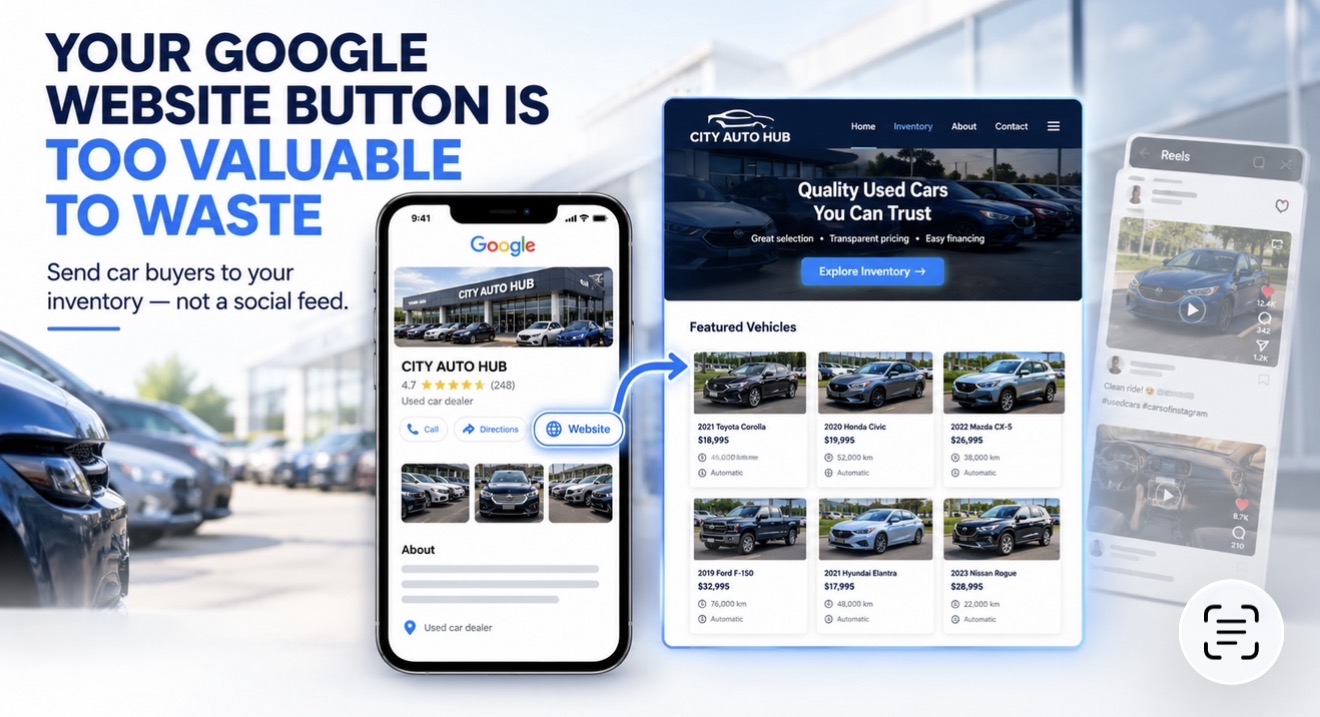
Should the Website button on your Google Business Profile open your Instagram page if that is where you post every new arrival? For a used-car showroom, the better destination is a page where someone can assess your available cars and enquire about a particular vehicle.
If your team keeps its social accounts current, sending buyers there can feel sensible. But a buyer trying to avoid a wasted showroom visit needs to judge whether you have a suitable car, understand its asking price and arrange to see it. Treat the link choice as a decision about that task, rather than a tactic for improving search rankings.
A feed makes buyers piece together what is for sale
An arrival post records a car you advertised when you published it. Unless you maintain that post, it does not establish whether the vehicle remains available. A buyer who finds it later has to resolve that uncertainty before they can move towards a viewing.
If your stock posts sit among delivery photographs and promotional videos, visitors must separate cars for sale from cars you have already sold. They then have to find the details for each candidate. The information may exist, but you have given the buyer the job of assembling it.
Posting frequently does not necessarily solve this. A newer post about another vehicle cannot correct an old caption, and a fresh walk-around does not identify every car still in stock. Posting activity and stock accuracy are different jobs.
Access creates another possible interruption. Your own signed-in view does not establish what a new visitor can open. If Facebook, Instagram or YouTube presents that visitor with a sign-in screen or an app prompt, looking at a car now involves an unrelated task. The relevant question is whether someone can inspect the stock without first dealing with an account.
The website must make the cars easier to assess
The destination should present cars that are currently offered for sale, with asking prices visible beside them. Sold vehicles should leave the available-stock results, while reserved cars need a clear status. Otherwise, the website reproduces the uncertainty of an old social post, just under your own domain.
Each vehicle needs enough information for a buyer to distinguish it from similar stock. That means the variant, year, odometer reading, fuel type and gearbox, rather than a model name followed by enthusiastic adjectives. Ownership count and available service records help explain the particular car. Photographs should show that vehicle, including its condition, rather than merely illustrate the model.
Show the asking price in rupees without requiring an enquiry to reveal it. A monthly instalment does not tell the buyer the vehicle’s price. If you advertise finance alongside the car, keep the asking price equally clear and explain what it includes.
On a phone, the stock list should be easy to reach and vehicle details readable without zooming. Photographs should open without covering the information or contact controls. A homepage can work if it gives stock clear prominence; a long showroom introduction with inventory buried in a menu does not answer the buyer’s immediate question.
The destination also needs to match the showroom the buyer found. Google’s business representation guidelines say the website should represent the individual business location. If you operate several sites, make each car’s location clear so that someone investigating one showroom does not unknowingly select a vehicle held elsewhere.
A neglected website does not deserve the link simply because it is a website. If it advertises sold stock or cannot be used properly on a phone, repair those weaknesses before directing buyers there. A useful, maintained social page is not improved upon by an unusable replacement.
The enquiry should identify the car
Finding a suitable vehicle should lead naturally to a conversation about that vehicle. A general contact form that discards the car’s identity forces the buyer to explain what they were looking at. Asking them to find the listing again or send a screenshot is work the page could have avoided.
WhatsApp’s click-to-chat guidance explains that a link can open a conversation without the visitor first saving the number, and can include a prepared message. On a vehicle page, use that message to carry the car’s name and stock reference or its page link into the enquiry.
A suggested message is: “Please confirm availability for [vehicle name and stock reference]. Can I arrange a viewing?” The buyer can edit it before sending. The purpose is to identify the car, not to put a sales script in the buyer’s mouth.
Keep a visible calling option for someone who would rather speak to the showroom. The number should be readable as well as tappable, and the vehicle reference should remain easy to find. Contacting you should not require a WhatsApp account or a lengthy form.
Social profiles still have a place on Google
A walk-around video can introduce a car to someone who was not searching for your showroom. Delivery posts can show the business at work. Those are good reasons to maintain social profiles, but they do not make a general feed the best destination for someone who has deliberately chosen Website.
Google’s social-link guidance provides a separate Social profiles field, with support for Facebook and Instagram, among other platforms, including YouTube. Google permits one link for each supported platform. It also says the feature is limited to selected regions and may be unavailable on a particular Business Profile, so do not assume your showroom will have the field.
Where the option appears, it lets you offer social channels without making them the website destination. Your own site can also give visitors clearly labelled links to those accounts. Someone who wants to watch your videos can choose that route; someone comparing available cars should not have to take it.
Judge the switch by the published journey
Once the destination is ready, changing the address is the smaller part of the job. Google’s profile-editing help explains that the managing account can edit business information through Search or Maps using Edit profile. The Website field takes the full web address. Replace the social destination with the appropriate dealership page and save the change.
Saving does not establish what buyers can see. Google’s explanation of edit reviews distinguishes accepted changes from those still pending or not approved. Check the public profile rather than treating the address shown in the editor as proof that the new link is live.
The meaningful test starts on a phone at the published Google profile, not at your website’s homepage. Follow Website to an available vehicle and send a test enquiry. Check that it reaches the intended showroom contact with the correct car identified. Also inspect the browsing experience while signed out, so your own accounts do not conceal an access problem.
The decision is about what happens after someone finds your showroom. Give that person a dependable place to choose a car and begin a relevant conversation. That is the job the Website button should serve.